
AI Customer Service Agents: How They Work and How to Build One
What AI customer service agents are, what they can resolve, when they hand off to a person, and how a B2B company in Spain can build and launch one in weeks.

An AI customer service agent is software that understands what a customer needs, pulls the right information from your systems, and takes the action itself: it checks an order, updates a ticket, issues a document or passes the case to a person with the full context. A chatbot mostly answers. An agent resolves. For a B2B company in Spain, the realistic path is to start with one narrow, high-volume use case, connect it to the systems you already run, and have it live in weeks, with humans handling anything sensitive.
This guide covers what these agents do, what they need, where they should stop, the rules that apply in Spain and the steps to build one.
TL;DR
- An agent reasons over context, calls tools such as your CRM or ERP, and completes multi-step tasks. A traditional chatbot follows scripted decision trees.
- The best first targets are repetitive requests with clear answers: order and delivery status, invoice questions, account changes, technical first-line support.
- Quality depends less on the model than on approved knowledge, clean integrations and a well-designed handoff to a human.
- In Spain, plan for the GDPR and the EU AI Act from day one: tell users they are talking to AI, and keep human oversight.
- Start with one use case, measure resolution rate and escalation quality, then expand to the next wave.
Table of Contents
- What an AI customer service agent actually is
- How an agent understands a request and acts on it
- What AI agents can handle: use cases that pay off first
- What data, tools and integrations it needs
- What an agent should not handle, and how to hand off
- Privacy and AI rules for companies in Spain
- Our perspective
- How to build and launch one, step by step
- Build, buy or bring in a partner
- Work with us on your support agent
- FAQ
- Sources
What an AI customer service agent actually is
The label gets stuck on almost anything with a chat window, so the distinction is worth making precise. According to Databricks, a traditional chatbot follows decision trees and predefined scripts, while an agent reasons about context, calls external tools and completes tasks with several steps.
In practice that gives you three levels:
| Rule-based chatbot | Generative chatbot | AI agent | |
|---|---|---|---|
| How it answers | Fixed flows and keywords | Generates text from a knowledge base | Interprets intent, plans, uses tools |
| Can it act in your systems? | No | Rarely | Yes, through authorized tools |
| Handles multi-step requests | No | Limited | Yes |
| Typical failure | Dead ends (“I didn’t understand”) | Confident but unverified answers | Wrong action if permissions and checks are weak |
| Best for | Simple menus | FAQ deflection | Resolving requests end to end |
The third column is why the topic is attracting budget. A customer asking “where is my order and can you change the delivery address?” needs a lookup and a change in a live system, not a paragraph of text.
How an agent understands a request and acts on it
Under the hood the loop is consistent across most serious implementations. Kimi’s description of the operating cycle covers interpreting the intent, building context, retrieving approved information, planning, calling tools through APIs and checking whether the goal was completed. It also makes a point that matters for security: the model does not edit the CRM directly. It requests an authorized tool, and that tool applies your rules.
Translated into a support scenario:
- Intent. The customer writes in Spanish, English or German that an invoice looks wrong.
- Context. The agent identifies the customer and finds their account and recent invoices.
- Approved knowledge. It retrieves your billing policy, not whatever the model remembers from training.
- Plan. It decides: check the invoice against the order, explain the difference or open a correction request.
- Tool call. It calls the invoicing or ERP interface with limited permissions.
- Check. It confirms the result and tells the customer what happened, or escalates.
The design principle that follows: the agent should be able to do only what a tool explicitly allows. Permissions are your safety net, not the prompt.
What AI agents can handle: use cases that pay off first
Not every request deserves automation. The strongest candidates share three traits: high volume, a clear right answer and data that already lives in a system. For B2B companies with 10 to 500 employees, these tend to be the first wave:
- Order, shipment and delivery status. The lookup is trivial for software and tedious for people.
- Invoice and payment questions. Copies of invoices, due dates, mismatches between order and invoice.
- Technical first-line support. Troubleshooting from manuals and product documentation, including in several languages. Our multilingual technical customer service case shows this kind of build.
- Account and contract changes. Updating contact data, adding a user, rescheduling a visit.
- Ticket triage and routing. Classifying incoming email by topic, urgency and customer tier, then sending it to the right team with a summary.
- Agent assist. Drafting replies and summarizing long threads for your human team, so each person handles more cases.
- Order intake from messaging channels. For example, turning WhatsApp messages into structured orders in an ERP, as in our WhatsApp-to-ERP ordering case.
A useful filter before you pick: export a month of tickets, group them by reason and count. If three or four reasons account for a large share of volume and each has a documented resolution, you have your first agent.
What data, tools and integrations it needs
An agent is only as capable as the systems it can reach. Think in three layers.
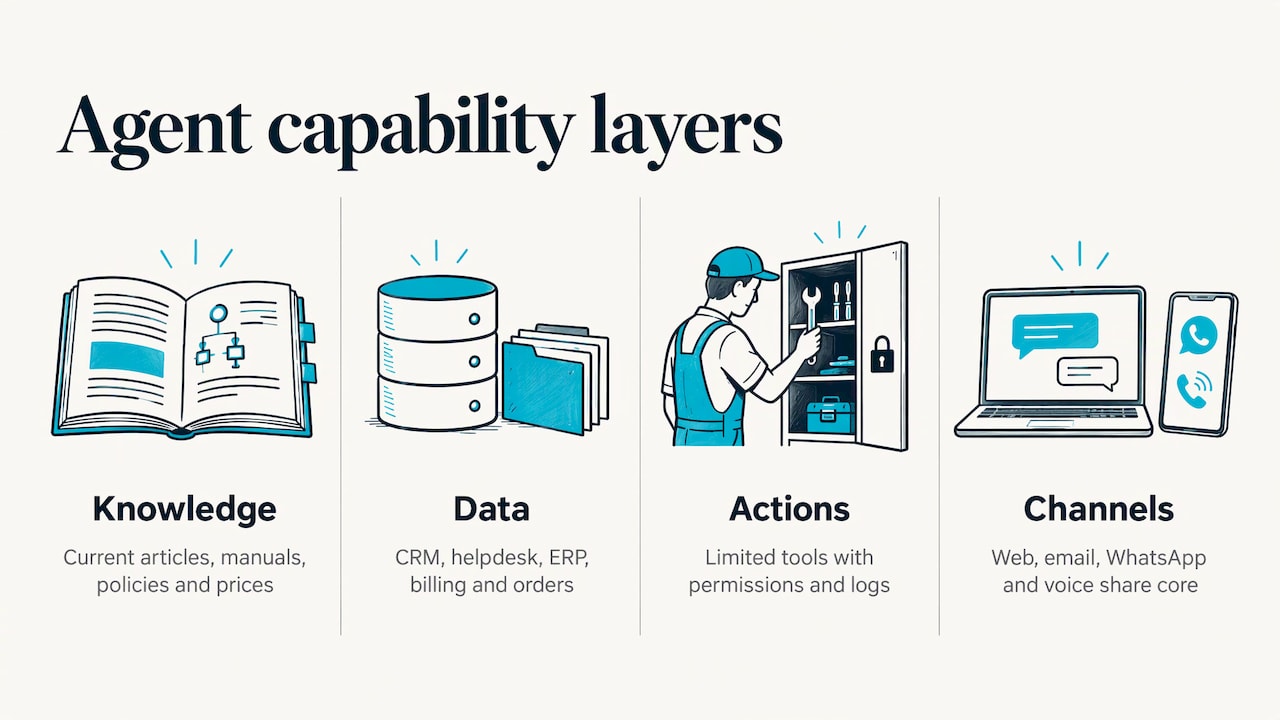
Knowledge. Help-center articles, product manuals, policies, price lists, past resolved tickets. It needs to be current and owned by someone, because an agent will repeat an outdated policy as fluently as a correct one.
Customer and operational data. Your CRM, helpdesk, ERP, billing and order system. This is where the agent finds who the customer is and what happened to their order. If these systems do not talk to each other, the agent inherits the mess, which is why integration work usually comes before the conversational layer. We build on the stack a company already has, and our ERP and CRM implementations and integrations are often the unglamorous half of a good support agent.
Actions. A short list of narrowly scoped tools: look up an order, create a ticket, send an invoice copy, book a call. Each tool has defined inputs, defined permissions and a log.
Channels come last: web chat, email, WhatsApp or voice are interfaces over the same core. Build the core once and add channels as volume justifies it.
What an agent should not handle, and how to hand off
The goal is not zero humans. It is putting people where their judgment matters. Databricks proposes a split: automate routine queries end to end, assist professionals with summaries and drafts, and keep delicate decisions for human and AI collaboration.
In B2B support, treat these as human-first or human-approved:
- Complaints involving contract disputes, penalties or legal exposure
- Refunds, credits and exceptions above a threshold you set
- Anything touching a key account at risk of churn
- Requests where the customer is clearly frustrated or asks for a person
- Cases where the agent’s confidence is low or the data conflicts
How the handoff works matters as much as when it triggers. A good one does not just forward the chat. Kimi recommends delivering a summary of the request, the information gathered and the state of the flow, so the person continues without making the customer repeat everything. Build that into the design: the agent writes a structured note, tags the reason for escalation and routes to the right queue and language.
Privacy and AI rules for companies in Spain
Two pieces of EU law shape any customer-facing agent you run in Spain. This is a practical orientation, not legal advice: have your data protection officer or a lawyer review the final design.
Tell customers they are talking to AI. Article 50 of the EU AI Act sets transparency obligations, and for chatbots and virtual assistants providers must design systems so users are informed they are interacting with AI. Put a clear label at the start of the conversation and an easy route to a person.
Respect the GDPR. You need a legal basis for processing, clear information on the controller, purpose, recipients, retention and rights, and a data protection impact assessment when processing is likely to be high risk. Spanish legal guidance summarizes these duties for chatbots and automated processing. For decisions with legal or similarly significant effects, Article 22 of the GDPR sets a general prohibition on fully automated decision-making, with exceptions and safeguards. Keeping a person in the loop for refunds, contract terms and credit-type decisions is both good service design and good compliance.
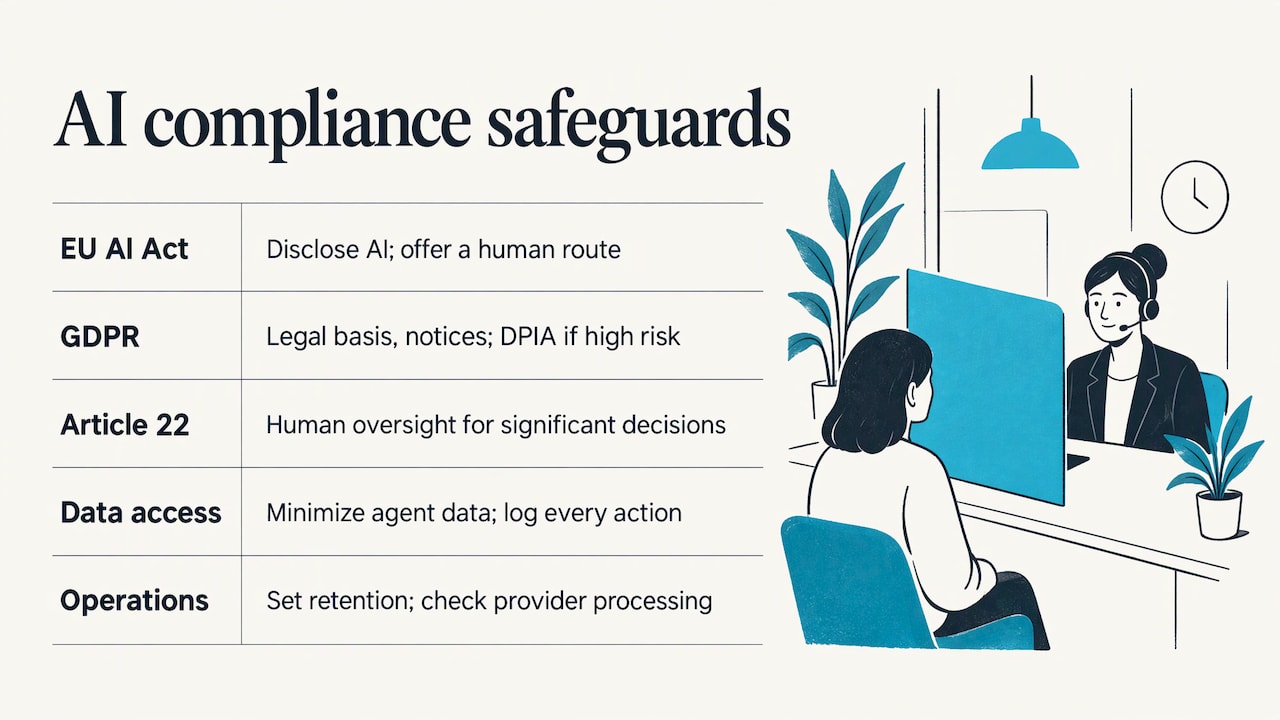
Operationally, that means: minimize the data the agent can see, log every action, set retention periods for transcripts, check where the model provider processes data, and document who supervises the system. A compliance overview for companies in Spain adds that systems should be classified by risk and role, with human oversight maintained.
Our perspective
Most failed support agents we see were not failures of the AI. They were failures of scope. Someone tried to automate “customer service” as a whole, instead of the four request types that make up most of the volume.
Our approach is the opposite. We pick one use case, connect the agent to the systems the company already runs, and ship something working in weeks, not months. We are tech-agnostic: we build on your stack rather than asking you to replace it, and the founders and senior operators lead the work start to finish, not a rotating junior team.
We care about two numbers: how many requests are resolved without a person, and how good the cases are that do reach a person. An agent that escalates well, with a summary, the data collected and the reason, makes your human team faster, and customers notice.
That is also why we do not sell slide decks. You should see a live agent handling real requests, with measurable results, before you decide on the next wave.
Mario
How to build and launch one, step by step
1. Define one use case and one metric
Pick the request type with the highest volume and clearest answer. Write the success metric before you build: share of conversations resolved without a person, average handling time or first-response time. Add a quality metric, such as the share of escalations that arrive with complete context. How to turn that metric into a return is in Measuring AI ROI.
2. Audit the data and systems
List where the answers live and what the agent must read or change. Identify gaps: missing APIs, duplicated customer records, policies that exist only in people’s heads. Fixing these is often the largest part of the work, and it benefits the whole business, not only support.
3. Write the boundaries
Decide what the agent may do alone, what needs approval and what always goes to a human. Set thresholds for amounts, sensitive topics and low confidence. Draft the AI disclosure and escalation wording.
4. Build the agent and its tools
Connect approved knowledge, then add the narrow tools one at a time. Test each tool in isolation before the agent can call it. Keep permissions minimal and log every call.
5. Test against real history
Replay a few hundred past tickets, including the awkward ones: angry customers, missing data, ambiguous requests, other languages. Have your support team review the results and mark where the agent should have escalated. Fix the failures before customers see them.
6. Launch narrow, then widen
Start with a share of traffic or a single channel, with humans watching closely. Review conversations weekly, update knowledge and tune the escalation rules. When resolution holds steady, add the next request type or channel.
7. Monitor and improve
Track your metrics, sample conversations for accuracy and tone, and review them against policy changes. Agents drift when products, prices and policies change and nobody updates their knowledge. Assign an owner.
Build, buy or bring in a partner
Packaged support tools can cover simple FAQ deflection. They struggle when the agent must act in an ERP, work with an unusual stack or follow your own business rules. A custom build costs more upfront in effort but fits your processes, and a partner who has done it before shortens the learning curve. A sensible middle path is an initial audit to find where an agent will pay back, then a fixed-scope implementation. Our AI automation consulting is built around that sequence, and custom AI development covers cases where off-the-shelf does not fit.
Work with us on your support agent
If you want an agent handling real requests in weeks rather than a strategy document, our AI customer service work is designed to resolve more and escalate less. We scope a fixed project around one use case, connect your CRM, helpdesk or ERP, and stay on afterward for monitoring and the next wave of automation. For the wider picture, see our AI agents for business and AI consulting pages.
Tell us the three request types that fill your inbox, and we will tell you which one to automate first. Email contact@unlockmanagement.com. We reply within 24 business hours. There is no public rate card.
FAQ
What is the difference between an AI customer service agent and a chatbot?
A traditional chatbot follows scripted flows and decision trees. An agent interprets the request, retrieves approved information and calls tools to complete multi-step tasks, such as checking an order and changing it. That ability to act in your systems is the practical difference.
Which requests should I automate first?
Choose high-volume requests with a clear right answer and data already in a system: order status, invoice copies, account changes and first-line technical questions. Group a month of tickets by reason and start with the largest category that has a documented resolution.
Do I have to tell customers they are talking to AI?
Yes, in the EU the AI Act’s Article 50 requires systems that interact with people to be designed so users are informed they are dealing with AI. A clear label at the start of the chat and an easy way to reach a person is the standard approach.
How long does it take to build one?
A focused agent for one use case can be live in weeks when the underlying systems are accessible. Timelines stretch when integrations are missing or knowledge is scattered, which is why we audit data and systems first.
When should the agent pass a case to a person?
Pass it on for disputes, refunds above your threshold, at-risk key accounts, frustrated customers, low confidence or conflicting data. The handoff should include a summary of the request, the information collected and the state of the flow.