
Lead Scoring Automation: How to Build It in Your CRM
How to automate lead scoring in a B2B company: fit and behavior criteria, rules versus AI, thresholds, routing to sales and how to test the model.

Lead scoring automation means your CRM updates a score for every prospect on its own, based on who they are and what they do, and then acts on it: it alerts a salesperson, creates a task or moves the lead into nurturing. The score is the easy part. The value comes from the plumbing around it: clean data, agreed thresholds, routing and a feedback loop with sales. That is the work we build for B2B companies, on top of the CRM and tools you already run.
TL;DR
- Lead scoring automation keeps a prospect’s score up to date from fit data (industry, company size, role) and behavior data (demos requested, repeat visits, email activity), then triggers actions at set thresholds.
- Start with rules if you know what a good customer looks like. Move to AI scoring when you have enough won and lost history for a model to learn from.
- A score nobody acts on is decoration. Define who owns each score band, how fast they follow up and when a lead moves from marketing to sales.
- Test the model against real sales outcomes and review it at least quarterly.
- Most of the effort sits in CRM integration and data hygiene, not in the scoring formula.
Table of Contents
- What lead scoring automation actually does
- The two inputs: fit and behavior
- A simple points model, worked through
- Rules or AI scoring?
- From score to action: routing and handoffs
- How to implement it, step by step
- Testing whether the score works
- Common mistakes
- Our perspective
- Build it with Unlock
- FAQ
- Sources
What lead scoring automation actually does
Lead scoring is a data-based method that combines a prospect’s profile, digital behavior and buying intent to rank which opportunities deserve attention first. It differs from a salesperson qualifying a lead in conversation, which is slower and more subjective, as Sage’s Spanish-language guide to scoring explains.
Automation adds three things on top of a spreadsheet of points:
- Continuous updating. Scores change when a contact opens an email, visits a pricing page or requests a demo, without anyone recalculating them.
- Action at thresholds. Business.com describes CRM flows that, once a lead crosses a threshold, notify the salesperson, create a task, move the lead from marketing-qualified (MQL) to sales-qualified (SQL), or place lower-scoring leads in nurturing.
- Decay and enrichment. Coresignal’s guide notes that automation can lower scores after inactivity and enrich new records with external data.
If you are a founder or sales lead at a company with 10 to 500 employees, this is the practical effect: your two or five salespeople stop working the list alphabetically or by gut feeling, and spend their first hour on the leads most likely to buy.
The two inputs: fit and behavior
Every scoring model, manual or AI, is built from two families of signals.
Fit answers the question “is this the kind of company we sell to?” Typical fit data are industry, company size, job title and estimated revenue, the criteria Sage highlights. For a European B2B seller, add country or language, since you may serve some markets and not others.
Behavior answers “are they showing interest?” Examples are downloads, repeated visits to product pages, email opens and demo requests. The same source warns that a lot of activity does not necessarily mean immediate buying intent. A student downloading ten white papers is busy, not ready to buy.
A third family, intent, comes from outside your own channels, for example signals that a company is researching your category. HubSpot’s prospecting guide recommends treating fit as a filter, giving real weight to first-party interactions and using external intent as a complement.
In practice that means:
- Fit decides whether a lead can ever reach sales. A perfect-behavior lead from a company of three people, when you sell to companies of 50 or more, should not jump the queue.
- Behavior decides when. Among fitting leads, the one who just asked for a demo goes first.
Write criteria as observable actions
Vague criteria such as “shows interest” cannot be automated. HubSpot’s MQL guide supports expressing engagement through specific, observable actions. “Visited the pricing page twice in seven days” is a rule a system can run. “Seems engaged” is not.
A simple points model, worked through
Here is an illustrative model for a company selling an operations platform to mid-sized European manufacturers. The numbers are an example, not a benchmark.
| Signal | Type | Points |
|---|---|---|
| Industry matches target list | Fit | +15 |
| 50 to 500 employees | Fit | +15 |
| Job title is director level or above | Fit | +10 |
| Free email address | Fit | -10 |
| Requested a demo | Behavior | +30 |
| Visited pricing page twice in 7 days | Behavior | +15 |
| Opened an email | Behavior | +2 |
| No activity for 30 days | Decay | -10 |
Suppose the threshold for sales is 50 points. A head of operations at a 120-person manufacturer (+40 fit) who visits pricing twice (+15) reaches 55 and creates a task for a salesperson. A student with a free email address who opens five emails reaches 0 and stays in nurturing.
Most CRM scoring tools work this way. HubSpot’s documentation describes scores built from property and event rules grouped together, where you can add or subtract points per rule and set caps on the total score or on a group, so that once a cap is reached new rules no longer change the value. Caps matter: without one, a contact who opens 40 newsletters can outscore a real buyer.
Rules or AI scoring?
Automated scoring comes in two flavors, and the choice depends on your data, not on fashion.
Rule-based scoring applies transparent if-then logic that you write. You can explain every point. It works when you already know what a good lead looks like.
AI scoring learns from historical conversions. Snowflake’s explainer says an AI model learns from past won and lost deals, while traditional scoring applies rules and points manually. It can also combine CRM, web, email and third-party data. Business.com notes that predictive scoring can detect non-obvious correlations but needs enough history to do so.
| Rule-based | AI (predictive) | |
|---|---|---|
| Logic | You define points | Model learns from won and lost deals |
| Explainability | Every point traceable | Needs explanation layer |
| Data needed | Your knowledge of the ideal customer | Enough clean historical outcomes |
| Best when | Starting out, low volume | Higher volume, rich CRM history |
The two are complementary. Clear rules are useful when you know what characterizes a good lead; predictive models add patterns when there is enough history. A sensible path for most mid-sized B2B teams is to launch with rules, collect clean outcome data for a few quarters, then bring in a model.
What a model needs in practice
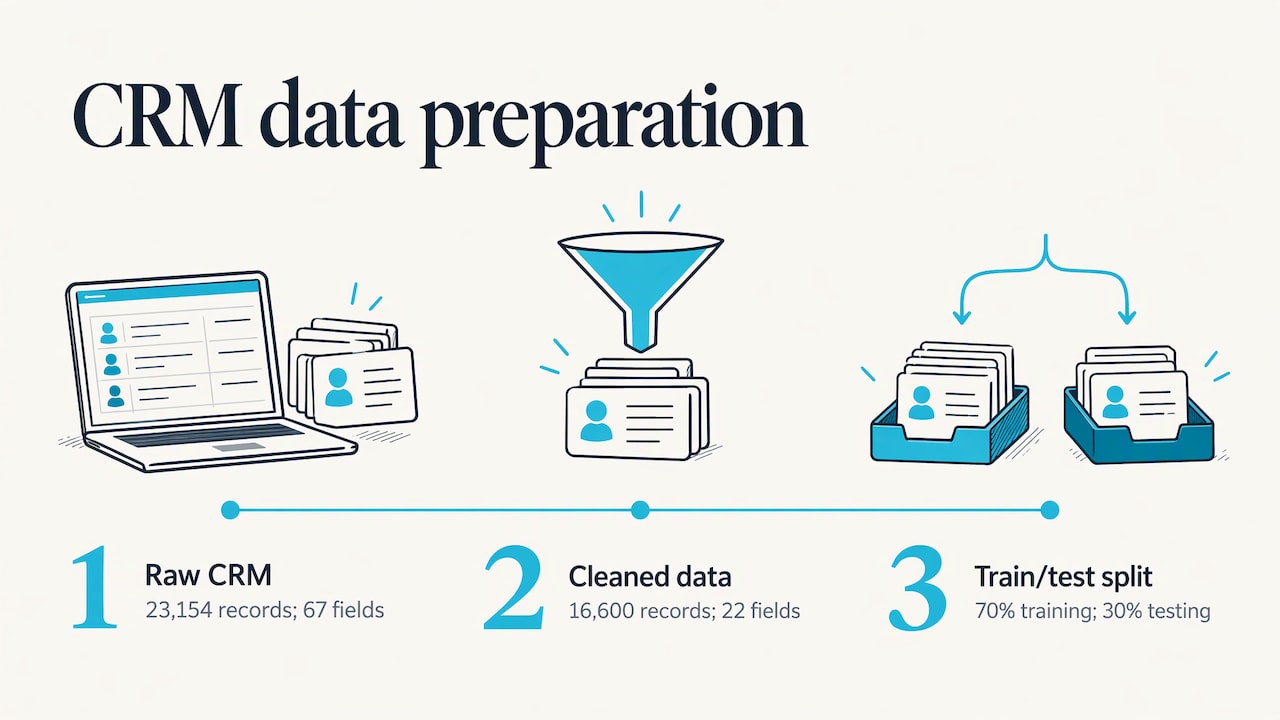
A 2025 case study in Frontiers in Artificial Intelligence shows how much preparation sits behind AI scoring. It started from 23,154 CRM records with 67 fields from a B2B software company, covering January 2020 to April 2024. After cleaning, 16,600 records and 22 fields remained, split randomly into 70% for training and 30% for testing. Roughly a third of the records and two thirds of the fields did not survive. If your CRM has duplicate companies, free-text job titles and missing outcomes, that is where the project starts.
From score to action: routing and handoffs
A score only creates value when it changes what someone does on Monday morning. Salesforce’s guidance on AI lead qualification suggests that marketing and sales agree on criteria, thresholds and handoffs, because a score without a clear owner for follow-up does not guarantee a commercial response.
A workable routing design has four parts:
- Bands. For example 0 to 29 nurturing, 30 to 49 marketing keeps warming, 50 and above sales.
- Owner and speed. Who gets the lead (by territory, language or account owner) and within what time they must act.
- Action. A task in the CRM, a Slack or email alert, a stage change from MQL to SQL.
- Fallback. What happens if the lead is not worked: reassignment, escalation or return to nurturing.
The same logic can power a daily priority list: scores become CRM segments, alerts and tasks the sales team sees without opening a report. Watch for the failure that kills most projects: a perfect score that lands in a CRM field nobody looks at. Put it in the views, notifications and tasks your team already uses.
How to implement it, step by step
The sequence below follows the process Salesforce outlines for qualification: define the ideal profile, connect your systems, choose the approach, set thresholds and routing, agree on what a qualified lead is, and review regularly.
1. Define the ideal customer profile
Pull your last 20 to 50 won deals and look for what they share: industry, size, role of the buyer, how they first reached you. This becomes your fit criteria. The common mistake is writing the profile from aspiration rather than from closed deals.
2. Audit and connect your data
List where lead data lives: CRM, marketing automation, website analytics, email, sometimes a spreadsheet or an ERP. Check duplicates, empty fields and inconsistent job titles. When we work on this, we build on your existing stack rather than asking you to replace it, and we handle the CRM and ERP integrations that make the data flow.
3. Choose rules, AI or both
Use the table above. Under a few hundred closed deals with clean outcomes, start with rules.
4. Set thresholds and routing
Pick a first threshold you can staff. If sales can handle 15 hot leads a week, set the line so about 15 pass, then adjust. Add decay so scores fall when a lead goes quiet.
5. Agree the definition with sales
Write down what a qualified lead is and when it transfers. Both teams sign it. Without this, marketing celebrates volume and sales ignores the queue. We use the same test in what counts as a qualified meeting: a named buyer in the ICP, not a positive reply.
6. Launch on a slice
Run the new score on one segment or one region for a few weeks, with salespeople flagging scores that look wrong. Fix rules before rolling out wider.
7. Review on a schedule
Plan a recurring review, at least quarterly, as Salesforce recommends.
Testing whether the score works
Automation makes scoring scalable. It does not make it correct. Coresignal’s advice is to treat automation and validity as separate matters: automatic updating helps at scale, but human verification and sales feedback remain necessary.
Three checks, in order of usefulness for a business team:
- Conversion by band. Do leads scored 50 and above become meetings and deals at a clearly higher rate than leads below 30? If the bands convert the same, the model is noise.
- Accepted and worked leads. Look at whether leads that sales accepted and actually followed up convert, not only whether the system produced scores.
- Sample review with sales. Each quarter, take ten high-scored leads that went nowhere and ten low-scored leads that closed. The patterns tell you which rules to change.
If you use an AI model, data scientists evaluate it with precision, recall, F1, a confusion matrix and ROC AUC, the metrics used in the Frontiers B2B study. Those tell you how well the model separates buyers from non-buyers on held-out data. Your commercial metric remains pipeline created and deals won from the leads the score prioritized.
Common mistakes
- Scoring activity instead of intent. Email opens are cheap signals. Weight them low and cap them.
- No negative scoring. Competitors, students, free email domains and unfit sizes should lose points.
- No decay. A demo request from eight months ago should not keep a lead hot.
- Two definitions of a lead. Marketing and sales must share one.
- Set and forget. Your market, offer and channels change, so the weights must too.
Our perspective
We rarely meet a company whose scoring formula is the problem. The problem is that the CRM data is incomplete, the score lives in a field nobody sees, and sales and marketing never agreed what happens at 50 points.
That is why we treat lead scoring as a systems job. Our founders lead each project themselves, and we aim to ship working, measurable software in weeks rather than months, not to hand over a slide deck. We are tech-agnostic and build on the stack you already have, so the score, the alert and the task end up where your team already works.
Scoring also works best when it feeds a pipeline you control. Pair it with outbound, and you can see which target accounts reach your threshold and what to say to them. Pair it with an AI agent for inbound leads, and the first reply can be immediate while the score decides who a human calls. That handoff is what we shipped in contact the lead on WhatsApp, then call.
Mario
Build it with Unlock
If you want scoring that ends in tasks your salespeople actually work, our AI implementation team builds production-grade AI solutions for sales, customer service and workflow automation for European B2B companies, and our CRM and ERP integration work connects the systems the score depends on. Engagements are fixed-scope projects, with an optional retainer for monitoring and the next wave of automation.
If your scored leads should also feed a steady flow of new conversations, our outbound as a service work builds the B2B pipeline system behind it. You can see how we approach an inbound case in Laura, the AI that turns inbound leads into sales conversations.
Email contact@unlockmanagement.com. We reply within 24 business hours. There is no public rate card.
FAQ
What is the difference between lead scoring and lead qualification?
Lead scoring is a data-based ranking that updates automatically from profile and behavior. Qualification is a judgment, often a conversation, about whether a prospect has the need, budget and timing. The best setups use the score to decide who gets that conversation first.
How much data do I need for AI lead scoring?
Enough won and lost history for a model to learn from, with consistent fields. The Frontiers study began with more than 23,000 records and kept about 16,600 after cleaning. If you have far fewer closed deals, start with rules and collect clean outcomes.
Can I automate lead scoring inside my current CRM?
In most cases yes. CRM scoring tools let you add or subtract points for properties and events, set caps and trigger workflows at thresholds. The harder part is connecting data from other systems and agreeing on routing, which is typically where custom integration helps.
How often should I update the scoring model?
Review it at least quarterly, comparing scores with real commercial outcomes and recalibrating thresholds and weights. Review sooner after a change in offer, pricing or target market.
Sources
- Sage Advice España: Cómo aplicar el lead scoring para priorizar ventas
- Business.com: How to Build a Lead Scoring System
- Coresignal: Lead Scoring, B2B Criteria Examples, Models & Best Practices
- HubSpot: Data prospecting, how to prioritize the right prospects
- HubSpot España: MQLs, cómo maximizar tus leads
- HubSpot Knowledge Base: Overview of the lead scoring tool
- Snowflake: AI Lead Scoring, How It Works & Best Practices
- Frontiers in Artificial Intelligence: The relevance of lead prioritization, a B2B case study
- Salesforce: AI Lead Qualification, How It Works, Benefits & Top Tools